

For clients / Getting started
Switch between clients
If you review for more than one client, choose which one you are working on.
Before you start
Your agency, or more than one agency, has added you to more than one client. With only one client, there is nothing to switch and Unit doesn't appear.
Steps
-
Find Unit at the top of the menu, under the logo. On a phone, open Menu first.
-
Choose the client you want to work on.
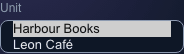

A client user who reviews for two clients of the same agency.
What happens next
Plans to approve opens for the client you chose. Plans to approve, Completed plans, Planned posts and your notifications show only that client until you switch again.
Notes
- If your clients belong to different agencies, each option shows the client and the agency.
- A link to a plan, for example from an email, opens the plan even if it belongs to another of your clients. The app switches for you.
- Recently deleted lists the comments you deleted for all your clients, whichever one you have open.
- Online shows the agency of the client you have open, if that agency shows it to clients. See Notifications and who is online.