

For agencies / Sharing & approval
Export a plan
Export a plan as a PDF or a PowerPoint deck to keep a snapshot or share it outside the app.
Who can do this: All staff
Steps
-
Open the plan.
-
Select Export in the plan header.
-
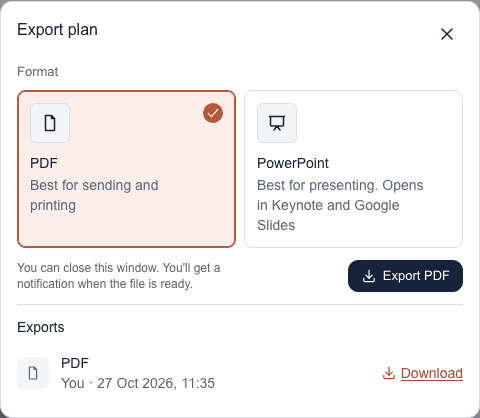
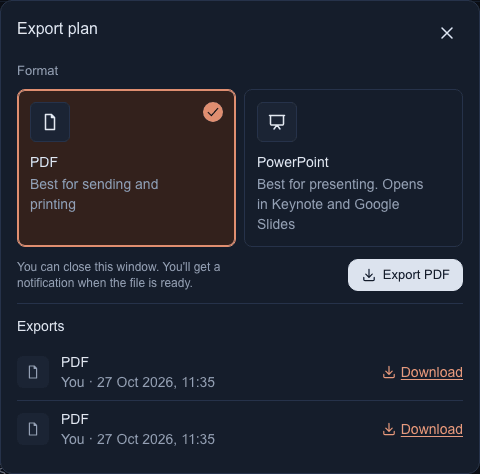
In the dialog, choose the PDF or PowerPoint card. PDF is chosen when the dialog opens.
-
Select Export PDF or Export PowerPoint. The export joins the list under Exports and shows Waiting or Exporting… until it is ready.
-
When the row shows Download, select it to save the file. You can close the dialog while you wait: the export carries on, and the bell tells you when it is ready. Its link opens the dialog again.
What happens next
Both files hold the same plan, laid out the same way: a cover with the client's logo, the feed in grid order, a page for each post with its media, planned posting date, captions (the approved one in bold) and hashtags, then the story designs. A plan with alternatives gets a feed page per grid, with the chosen one marked.
The PDF is best for printing and for sending as one file. The PowerPoint deck (.pptx) is best for presenting: it opens in PowerPoint, Keynote and Google Slides, with each photo kept at up to 1920 pixels on its longest side, and you can edit or reorder the slides afterwards.
Notes
- One to three pictures sit beside the captions. A post with four or more pictures shows them in one row across the page, with its captions underneath. A long caption carries on to the next page.
- A post's hashtags follow its last caption, on the post's last page.
- Labels and dates follow the language you are using the app in when you export. Captions stay as they were written.
- Comments and internal notes are never included.
- Export after sharing, and again when the plan is completed, so everyone has a clear snapshot.
- Your client can export shared and completed plans too.
- The Exports list shows who exported the plan, when, and how it is going. Staff see every export of the plan; your client sees only the exports made on the client side.
- A file stays available for 7 days, then its row reads Expired. A row that reads Failed has a Try again button.
- Each person can export 10 files in 10 minutes, PDF and PowerPoint together. If you reach that, a message under the export button says when to try again.